
For buyers searching for the best computers, tablets & components, I rank the Microsoft Surface Pro 2024 13-inch Copilot+ PC as the best overall pick because it comes closest to replacing both a laptop and a tablet. The Lenovo Idea Tab Pro stands out for students and media-heavy buyers who want a large 3K screen with pen support, while the Fusion5 10.1-inch Windows 11 Professional Rugged Tablet PC makes more sense for field work and warranty protection. The main tradeoffs are Windows versus Android, premium polish versus bundle value, and real storage speed versus big headline memory claims. I also weighed accessory costs, display size, update confidence, and whether each device can handle more than casual browsing. Keep reading for the full breakdown of which pick fits each kind of buyer.

Get kitchen staples and gadgets delivered free — and shop member deals
- Fast, free delivery on millions of items
- Access to Prime Big Deal Days deals on October 6–7
- Prime Video, Amazon Music and more included
Key Takeaways
- The Surface Pro 2024 leads the ranking because it has the strongest laptop-replacement case, but it also asks buyers to pay premium prices and often budget for accessories.
- Lenovo has the strongest student story: the Idea Tab Pro is the better performance and display pick, while the Idea Tab 11 is the cleaner value choice for basic classwork.
- Fusion5 owns the Windows utility lane, with the Rugged model favoring durability and warranty coverage and the Helios 12 favoring screen sharpness, SSD space, and active cooling.
- The TABWEE and Jeazans tablets compete on bundles and big spec claims, but buyers should separate real processor class, usable storage, and update support from marketing numbers.
- Renewed and compact Windows tablets are price plays: the Surface Pro 7+ and 10.1-inch Windows tablet can be useful, but they are weaker long-term bets than the newer Surface, Lenovo Pro, or Fusion5 options.



More Details on Our Top Picks
10.1″ Windows 11 Tablet with 6GB RAM, 128GB Storage, Intel Processor, 6000 mAh Battery
I rank this as the budget Windows pick because it gives buyers real desktop-style software access without the higher cost of the Microsoft Surface Pro 2024 or the tougher Fusion5 rugged model. The 6GB RAM and 128GB storage are enough for email, browser work, school portals, light Office files, and streaming, while the USB 3.0 and Micro HDMI ports make it more flexible than many low-cost Android tablets. The tradeoff is speed headroom: compared with the Fusion5 Windows 11 Professional Rugged Tablet PC, this model is less suited to heavy multitasking, large spreadsheets, or demanding Windows apps. I also see the plastic shell as practical rather than premium, so it fits buyers who care more about function and price than polish.
Pros:- Runs Windows 11 Home for familiar desktop-style apps
- USB 3.0 and Micro HDMI add useful accessory and display options
- 128GB storage covers basic files and apps better than many entry tablets
- Portable 10.1-inch size works well for shared family or school use
Cons:- 6GB RAM can slow down under heavier Windows multitasking
- Plastic shell feels less upscale than metal or rugged alternatives
- Storage expansion is limited compared with Android rivals offering 1TB or 2TB support
Best for: I would point this at students, families, and light office users who need an inexpensive Windows device for everyday web, document, and video tasks.
Not ideal for: I would skip it for buyers who keep many Windows apps open at once or want a metal-bodied tablet with a more premium feel.
- Screen Size:10.1 inches
- Operating System:Windows 11 Home
- RAM:6GB
- Storage:128GB, expandable to 128GB via microSD
- Processor:Intel processor
- Battery:6000 mAh
- Connectivity:Wi-Fi, Bluetooth 5.0
- Ports:USB 3.0, Micro HDMI
- Camera:Dual cameras
Bottom line: I would choose this for low-cost Windows basics, not as a full laptop replacement.
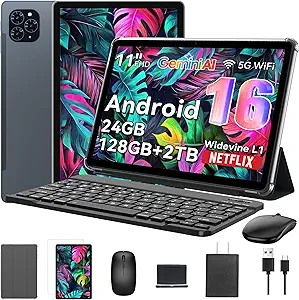
Jeazans Android 16 Tablet 2-in-1 Bundle with Keyboard, Mouse, Stylus & Case
The Jeazans tablet earns its place as my best accessory bundle because it arrives closer to a ready-made mini workstation than a plain slate. Compared with the TABWEE T20, it has less built-in storage at 64GB, but the included keyboard, mouse, stylus, and case make it appealing for students or mobile workers who want a laptop-like setup from day one. WiFi6 and Bluetooth 5.4 help it feel modern for cloud apps, calls, and synced accessories, while the 1TB expansion leaves room for downloads and class files. I would not rank it above the Microsoft Surface Pro 2024 for premium productivity, since Android apps still do not replace every desktop workflow. The virtual-memory RAM claim also needs sober reading: it helps app switching, but it is not the same as 24GB physical RAM.
Pros:- Keyboard, mouse, stylus, and case are included
- WiFi6 and Bluetooth 5.4 support faster wireless connections and accessories
- Storage expands up to 1TB for media, school files, and offline content
- Android 16 gives a current app platform with privacy-focused controls
Cons:- 64GB base storage is modest before adding a card
- 24GB RAM figure includes virtual memory, not all physical RAM
- Camera details are vague for buyers who need dependable video quality
Best for: I would point this at students and budget mobile workers who want a tablet, typing setup, pointing device, stylus, and case in one purchase.
Not ideal for: I would skip it for buyers who need Windows-only software, exact camera specs, or a higher-end productivity tablet.
- Model Number:Jzpad-KB10L
- Model Year:2026
- Operating System:Android 16
- Display Size:10.1 inches
- RAM:24GB, listed as 3GB plus 21GB virtual
- Storage:64GB, expandable to 1TB
- Processor:AMD 1.8 GHz
- Connectivity:WiFi6, Bluetooth 5.4
- Warranty:One-year limited warranty and three-year worry-free support
Bottom line: I would choose this when the bundled accessories matter more than premium display or desktop-app power.
Microsoft Surface Pro 2024 13″ Copilot+ PC
I rank the Microsoft Surface Pro 2024 highest for premium 2-in-1 buyers because it sits closer to a real laptop alternative than the smaller Android bundles in this batch. The Snapdragon X Plus, 16GB RAM, and 512GB storage give it stronger productivity footing than the 10.1-inch Windows tablet, and the 13-inch touchscreen is roomier for split-screen work, documents, and creative apps. Compared with the Fusion5 rugged tablet, the Surface is sleeker and more refined, but it is not the tougher choice for field use. The main drawback is cost creep: the detachable keyboard is sold separately, and some Copilot+ features depend on software availability. I would treat the AI features as a bonus, while the real buying reason is the mix of portability, battery life, and Windows-class flexibility.
Pros:- Snapdragon X Plus platform is built for strong mobile productivity
- 13-inch touchscreen gives more workspace than 10.1-inch tablets
- 16GB RAM and 512GB storage fit heavier everyday workloads
- Up to 14 hours of battery life supports long workdays
Cons:- Keyboard is sold separately, raising the real setup cost
- Some Copilot+ features require later software support
- Less rugged than the Fusion5 Windows 11 Professional Rugged Tablet PC
Best for: I would point this at professionals, students in demanding programs, and hybrid workers who want a polished tablet that can stand in for a laptop.
Not ideal for: I would skip it for rugged field teams or buyers who want the keyboard included in the listed package.
- Display Size:13 inches
- Processor:Snapdragon X Plus, 10-core
- AI Hardware:NPU for Copilot+ PC features
- RAM:16GB
- Storage:512GB
- Battery Life:Up to 14 hours
- Form Factor:2-in-1 laptop/tablet design
- Keyboard:Detachable keyboard sold separately
Bottom line: I would choose this as the premium pick when a tablet needs to feel like a serious Windows work machine.
TABWEE T20 Android 16 Tablet with 24GB RAM, 256GB ROM (Expandable to 2TB), Octa-Core Processor and Gemini AI
The TABWEE T20 is my storage-focused Android pick because its 256GB base capacity and 2TB microSD expansion make it far roomier than the Jeazans Android 16 Tablet out of the box. That matters for offline video, PDFs, photos, downloaded apps, and shared family use where storage fills quickly. The included keyboard, stylus, mouse, and screen protector also make it more complete than a bare tablet, while the T606 octa-core chip is a sensible match for everyday Android productivity. Against the Microsoft Surface Pro 2024, though, this is more of an affordable Android workstation than a premium laptop replacement. The 1280×800 display is the biggest compromise, especially beside higher-resolution tablets in the wider roundup, and the 5000mAh battery is more modest than TABWEE T90’s larger 8000mAh pack.
Pros:- 256GB base storage is generous for this class
- microSD expansion up to 2TB suits large media and document libraries
- Keyboard, stylus, mouse, and anti-glare screen protector are included
- Widevine L1 support allows 1080p streaming from compatible services
Cons:- 1280×800 resolution looks dated next to sharper tablets
- 5000mAh battery is only rated for up to 6 hours
- Accessory setup adds bulk for travel
Best for: I would point this at media-heavy families, students with lots of offline files, and Android users who want accessories plus large expansion room.
Not ideal for: I would skip it for buyers who prioritize a sharp display, mobile data, or long unplugged sessions above storage capacity.
- Processor:MediaTek T606 octa-core at 2 GHz
- Operating System:Android 16
- RAM:24GB, listed as 8GB physical plus 16GB virtual
- Storage:256GB ROM, expandable to 2TB via microSD
- Display:10-inch HD 1280×800 Incell
- Battery:5000mAh lithium polymer, 20Wh
- Cameras:8MP rear, 5MP AI front
- Included Accessories:Keyboard, stylus pen, mouse, anti-glare screen protector
- Warranty:2-year US warranty
Bottom line: I would choose this when storage and included tools matter more than screen sharpness.
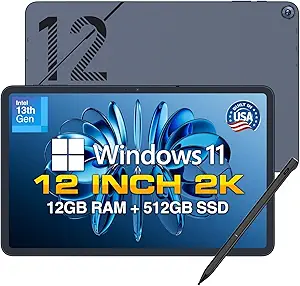
Fusion5 10.1” Windows 11 Professional Rugged Tablet PC – 12GB RAM, 512GB SSD, Intel 13th Gen N100 CPU – 2 Year Full Warranty with Accidental Damage
I give the Fusion5 Windows 11 Professional Rugged Tablet PC the rugged role because it solves a different problem than the Microsoft Surface Pro 2024: durability before elegance. The shockproof design, covered ports, and accidental-damage warranty make it better suited to warehouses, workshops, job sites, and travel-heavy work than the slimmer Surface or the basic 10.1-inch Windows tablet. It also has a stronger practical spec mix than that budget Windows model, with 12GB RAM, 512GB SSD storage, and an Intel N100 CPU for smoother multitasking and faster file access. The compromise is comfort and scale. A 10.1-inch screen can feel tight for long document sessions, and rugged hardware usually adds heft. I would choose this for reliability in rough settings, not for the sleekest tablet experience.
Pros:- Rugged shockproof build is better suited to rough work settings
- 12GB RAM and 512GB SSD give stronger Windows performance than entry tablets
- Covered ports help protect the device in dusty or active environments
- Two-year warranty includes accidental damage coverage
Cons:- 10.1-inch screen can feel cramped for extended laptop-style work
- Rugged build may be heavier and less sleek than consumer tablets
- microSD expansion ceiling is lower than some Android alternatives
Best for: I would point this at field technicians, warehouse teams, mobile service workers, and small businesses that need Windows in tougher environments.
Not ideal for: I would skip it for buyers who want a slim premium tablet, a larger screen, or the most polished couch-and-commute device.
- Display:10.1-inch Full HD IPS touchscreen
- Operating System:Windows 11 Professional
- CPU:Intel 13th Gen N100
- RAM:12GB
- Storage:512GB SSD, expandable with microSD
- Battery:6000mAh with fast charging
- Connectivity:Dual-band WiFi, Bluetooth 5.0
- Cameras:Dual Full HD cameras
- Warranty:2 years with accidental damage coverage
Bottom line: I would choose this for tough Windows work where durability and warranty protection beat thin design.
Lenovo Idea Tab 11″ College Tablet with 2.5K IPS Display and MediaTek Dimensity 6300
I’d rank the Lenovo Idea Tab 11 as the better everyday student pick over the TABWEE T90 when display quality and note-taking matter more than sheer accessory count. Its 2.5K IPS 90Hz screen, included pen, folio case, and low blue light certification make it more classroom-friendly than a basic FHD tablet, especially for reading PDFs, marking notes, and watching lectures. Compared with the larger Lenovo Idea Tab Pro, this model is easier to carry and gives more built-in storage at 256GB, but it gives up the Pro’s larger 3K panel and faster Dimensity 8300 chip. The 90Hz refresh rate is fine for studying and streaming, though buyers chasing slicker animation or richer stylus apps may prefer a higher-end tablet ecosystem.
Pros:- Sharp 11-inch 2.5K IPS display is better for reading and media than basic FHD panels
- Includes Tab Pen and Folio Case, lowering the add-on cost for students
- Up to 12 hours of YouTube battery life suits long study days
- 256GB storage gives more local room than many entry student tablets
Cons:- 90Hz refresh rate trails smoother 120Hz tablet displays
- Stylus software support is less deep than stronger iPad or Surface ecosystems
- MediaTek Dimensity 6300 is not aimed at demanding creative or gaming workloads
Best for: College students who want a portable tablet with a sharp display, pen support, and enough storage for notes, PDFs, and media.
Not ideal for: Digital artists or heavy stylus users who need a mature app ecosystem and higher refresh-rate drawing feel.
- Screen Size:11 inches
- Display:2.5K IPS touchscreen
- Refresh Rate:90Hz
- Processor:MediaTek Dimensity 6300
- RAM:8GB
- Storage:256GB
- Battery Life:Up to 12 hours YouTube playback
- Charging:20W fast charger
- Included Accessories:Tab Pen and Folio Case
Bottom line: This is my pick for students who want a ready-to-use note, class, and streaming tablet without buying core accessories separately.
Microsoft Surface Pro 7+ 12.3″ Tablet 2-in-1 (Renewed)
The Microsoft Surface Pro 7+ earns its spot because it behaves more like a compact laptop than most Android tablets here. Compared with the Lenovo Idea Tab Pro, the Surface is the better match for Windows apps, browser-heavy work, office files, and legacy software, helped by an Intel Core i7, 16GB RAM, and Windows 11 Pro. It also has both USB-C and USB-A, which makes accessories easier than on slimmer tablet-first designs. The tradeoff is value predictability: this is a renewed device, storage is limited to 256GB, and the listing says there is no built-in webcam, which matters for remote classes or meetings. I’d choose it over the Fusion5 Helios 12 for a lighter, more established 2-in-1 platform, but not for maximum ports or storage.
Pros:- Runs Windows 11 Pro for full desktop software access
- Intel Core i7 and 16GB RAM suit heavier multitasking than Android tablets in this batch
- Light 1.70 lb build is easy to carry between classes or meetings
- USB-C and USB-A ports reduce adapter dependence
Cons:- Renewed condition can vary by seller and unit
- 256GB SSD may fill quickly for large projects or local media
- No built-in webcam listed, which weakens it for remote meetings
Best for: Students, consultants, and office users who need a light Windows tablet for Microsoft 365, browser work, and legacy desktop apps.
Not ideal for: Video-call-heavy buyers or media collectors who need a built-in webcam and more than 256GB of internal storage.
- Screen Size:12.3 inches
- Resolution:2736 x 1824 PixelSense
- Processor:Intel Core i7-1165G7
- RAM:16GB
- Storage:256GB SSD
- Operating System:Windows 11 Pro
- Weight:1.70 lbs
- Ports:USB-C, USB-A, Surface Connect
- Connectivity:Wi-Fi 6 and Bluetooth 5.0
Bottom line: This is the one I’d pick when Windows software matters more than getting the newest tablet hardware.
Lenovo Idea Tab Pro Student Tablet with Google Gemini, 12.7″ 3K LCD Display, 8GB RAM, 128GB Storage, MediaTek Dimensity 8300 Processor
The Lenovo Idea Tab Pro sits above the Lenovo Idea Tab 11 because it favors workspace over pocketability. Its 12.7-inch 3K LCD gives students more room for split-screen notes, textbooks, diagrams, and video, while the Dimensity 8300 makes it a stronger performance pick than the smaller Lenovo’s Dimensity 6300. Compared with the Microsoft Surface Pro 7+, it is less suited to full Windows software, but it looks better for Android-based studying, media, and casual gaming thanks to quad JBL Dolby Atmos speakers and PUBG certification. The weak point is storage: 128GB is modest beside the Fusion5 Helios 12’s 512GB SSD, and the product data does not confirm expandable storage. I’d rank it high for campus use, but not for buyers who need desktop-class apps.
Pros:- Large 12.7-inch 3K display gives more room for study and media than 11-inch tablets
- MediaTek Dimensity 8300 is stronger than the Dimensity 6300 in the smaller Idea Tab
- Includes Tab Pen Plus and Folio Case for note-taking from day one
- 45W charging is faster than many student tablet chargers
Cons:- 128GB storage is modest for a large-screen productivity tablet
- No expandable storage option is listed
- Less suitable than Surface or Fusion5 models for desktop Windows software
Best for: Students who read large documents, watch lectures, and want a roomy Android tablet with pen and case included.
Not ideal for: Windows-first users, local file hoarders, or buyers who need confirmed expandable storage for large media libraries.
- Display Size:12.7 inches
- Resolution:3K LCD
- Processor:MediaTek Dimensity 8300
- RAM:8GB
- Storage:128GB
- Battery Life:11 hours video streaming
- Charging:45W fast charger
- Included Accessories:Tab Pen Plus and Folio Case
- Audio:Quad JBL speakers with Dolby Atmos
Bottom line: This is my big-screen Android pick for students who value reading space, pen input, and media quality over Windows app support.
Fusion5 Helios 12 Windows 11 Tablet PC – 12″ 2K Display, 12GB DDR5 RAM, 512GB SSD, Stylus Pen, Active Cooling Fan
I’d choose the Fusion5 Helios 12 over the Microsoft Surface Pro 7+ when ports, storage, and sustained workloads matter more than brand polish or featherweight carry. Its 512GB SSD, dual USB-C, USB 3.0, Micro HDMI, and active cooling fan make it better equipped for desk setups, external displays, and longer Windows sessions than most tablets in this lineup. Compared with the Lenovo Idea Tab Pro, it trades Android simplicity and a sharper 3K screen for Windows 11 Home and broader accessory support. The metal body and fan point toward a sturdier, more computer-like design, but that also means it may feel heavier than typical tablets. It is also likely too much machine for entry-level users who only need streaming, email, and light coursework.
Pros:- 512GB SSD gives far more local storage than many tablets in this batch
- Dual USB-C, USB 3.0, Micro HDMI, and headphone jack support a full desk setup
- Active cooling fan helps sustain performance during heavier Windows workloads
- Metal casing gives it a sturdier computer-like feel
Cons:- Likely heavier than slimmer consumer tablets due to metal build and cooling
- Higher price may not make sense for basic browsing or streaming
- 2K resolution is lower than Lenovo Idea Tab Pro’s 3K display
Best for: Mobile workers and students who want a Windows tablet with generous ports, large SSD storage, and cooling for longer work sessions.
Not ideal for: Casual tablet buyers who want the lightest device for reading, streaming, and travel.
- Display:12-inch 2K touchscreen
- Resolution:2000 x 1200
- CPU:Intel 13th Gen quad-core
- RAM:12GB DDR5
- Storage:512GB SSD
- Charging:36W USB-C PD fast charging
- Cooling:Built-in active fan
- Ports:2x USB-C, USB 3.0, Micro HDMI, 3.5mm jack
- Operating System:Windows 11 Home
Bottom line: This is my practical Windows tablet pick for buyers who need ports and storage more than a slim entertainment-first design.
TABWEE T90 11-Inch Android 16 Tablet with Gemini AI 3.5, 24GB RAM, 8000mAh Battery
The TABWEE T90 is the strongest bundle play here: keyboard, mouse, stylus, Android 16, and expandable storage make it feel ready for schoolwork or light home office tasks without a pile of extras. Compared with the Lenovo Idea Tab 11, it gives buyers more included input gear and microSD expansion up to 2TB, but the Lenovo has the sharper 2.5K display and a more study-focused tablet identity. Against the Fusion5 Helios 12, the T90 is easier to justify for casual productivity, though its Unisoc T615 chip is not built for demanding Windows-style workloads. The advertised 24GB RAM includes virtual memory, so I would treat it as a multitasking aid rather than a sign of high-end speed. It is a value pick with clear limits.
Pros:- Includes keyboard, mouse, and stylus for a low add-on cost
- Expandable storage up to 2TB gives it more media flexibility than fixed-storage tablets
- 8000mAh battery supports long daily use
- Android 16 and Gemini AI 3.5 add current software and productivity tools
Cons:- Unisoc T615 processor may lag behind stronger chips in heavier apps
- 24GB RAM figure includes virtual memory, so it should not be read like full physical RAM
- FHD display is less sharp than the Lenovo 2.5K and 3K options
Best for: Budget-minded students or home users who want an Android tablet kit for typing, browsing, video, and light productivity.
Not ideal for: Power users, gamers, or creative workers who need a faster processor and a higher-resolution screen.
- Operating System:Android 16
- Display Size:11 inches
- Resolution:1920 x 1200 FHD
- Processor:Unisoc T615 octa-core
- RAM:24GB total (8GB built-in + 16GB virtual)
- Storage:128GB ROM, expandable to 2TB via TF card
- Battery:8000mAh
- Cameras:13MP rear and 5MP front
- Included Accessories:Keyboard, mouse, and stylus
Bottom line: This is my value bundle choice for buyers who want many accessories and expandable storage more than premium tablet performance.
How We Picked
I based the ranking on practical computing value, not on the longest spec sheet. Since this roundup mixes tablets, 2-in-1 PCs, and component-like hardware choices, I gave the most weight to processor class, usable memory, storage type, display quality, input support, battery claims, warranty coverage, and software flexibility. Windows models scored higher when they could reasonably replace a laptop, while Android models moved up when they offered a better screen, included accessories, easier classroom use, or stronger value. I also treated upgrade limits and accessory costs as part of the real purchase price.
The final order favors devices with the clearest buyer fit. The Microsoft Surface Pro 2024 sits first because it balances premium build, modern platform support, and laptop-style productivity better than the rest. Lenovo and Fusion5 picks follow because they each solve a defined problem: student-friendly Android productivity on one side and practical Windows tablet computing on the other. Budget bundles rank lower when the value depends heavily on included accessories or oversized memory claims rather than stronger long-term performance.
Factors to Consider When Choosing Best Computers, Tablets & Components
The right choice starts with how the device will actually be used. I would separate this lineup into Windows tablet PCs, Android productivity tablets, student-focused media tablets, and bundle-first budget picks before comparing individual specs.
Start With The Operating System
I would choose the platform before chasing RAM numbers because Windows and Android solve different problems. Windows models such as the Surface Pro 2024, Surface Pro 7+, Fusion5 Rugged, and Fusion5 Helios run desktop apps, external displays, and office workflows more naturally. Android options like the Lenovo Idea Tab Pro, TABWEE tablets, and Jeazans bundle are smoother for streaming, reading, note-taking, cloud docs, and casual app use. The common mistake is buying a powerful Android tablet and expecting every desktop program to behave like it does on a laptop. The opposite mistake is buying a small Windows tablet for sofa use and getting a heavier, fussier device than needed. My rule is simple: pick Windows for software compatibility and Android for lower-friction media and classroom use.
Read Memory And Storage Claims Closely
Large RAM numbers are not equal across this lineup. A tablet advertising 24GB RAM may be combining physical memory with virtual memory, which can help multitasking but does not turn a budget Android processor into a premium PC chip. For Windows models, SSD storage matters more than many buyers expect because it affects app launches, file handling, and system updates. Expandable storage up to 2TB is useful for media files, but it is not the same as fast internal storage for apps and the operating system. The Fusion5 Windows tablets have an advantage here because their SSD-focused configurations feel more PC-like on paper. For Android buyers, I would rather have balanced processor strength and clean software support than the biggest memory claim on the box.
Match Screen Size To The Work
Screen size changes the entire feel of a tablet PC. A 12.7-inch or 13-inch display is better for split-screen notes, spreadsheets, creative work, and long reading sessions, which is why the Surface Pro 2024 and Lenovo Idea Tab Pro rise above smaller picks for productivity. The 10.1-inch and 11-inch models are easier to carry, but they ask for more zooming, scrolling, and window juggling. Resolution also matters: a 2K or 3K panel gives text more room to breathe and makes pen work feel less cramped. Buyers often overvalue portability and then regret the smaller workspace once a keyboard is attached. I would choose compact only when travel weight, handheld reading, or price matters more than multitasking.
Price The Full Kit, Not Just The Tablet
The cheapest tablet is not always the cheapest usable setup. A Surface Pro can become much more expensive once a keyboard, pen, sleeve, and protection plan are added. By contrast, the Jeazans 2-in-1 bundle and Lenovo Idea Tab Pro include more of the setup from day one, which helps buyers who do not want to shop for matching accessories later. The tradeoff is that bundled keyboards and cases may not match the feel, durability, or app integration of a premium ecosystem. Warranty length also changes value, which is where the Fusion5 Rugged model earns attention for buyers who expect drops, travel, or shared use. I would compare total setup cost before calling any model a bargain.
Know When Paying More Makes Sense
Paying more makes sense when the device will replace a laptop, handle work files, or stay in use for several years. The Surface Pro 2024 is the clearest premium buy because its platform, accessory ecosystem, and modern processor class give it a longer runway than budget tablets. The Lenovo Idea Tab Pro is a smarter premium Android choice when the buyer wants a big display and pen support but does not need desktop Windows apps. I would not pay extra for AI branding alone unless the rest of the hardware is strong enough for the buyer’s daily tasks. A renewed Surface Pro 7+ can save money, but battery age, condition, and warranty coverage matter more than the original launch prestige. For light streaming, email, and school portals, the Lenovo Idea Tab 11 or a bundle-first Android tablet can be the better use of money.
Frequently Asked Questions
Should I Buy The Microsoft Surface Pro 2024 Or A Cheaper Windows Tablet?
I would pick the Microsoft Surface Pro 2024 if the device needs to replace a laptop for work, writing, video calls, and long-term use. It has the strongest premium case in this lineup, especially against the smaller 10.1-inch Windows tablet and the older renewed Surface Pro 7+. A cheaper Windows tablet can still make sense for basic forms, web apps, or travel use, but it will usually involve more compromises in speed, screen space, build, or support. The Fusion5 Helios 12 is the middle path if Windows compatibility and storage matter but the newest Surface pricing feels too high. My cut line is workload: buy Surface for primary computing, buy cheaper Windows only for secondary tasks.
Are The TABWEE 24GB RAM Tablets As Powerful As They Sound?
The TABWEE T20 and TABWEE T90 look strong on paper because of their large memory claims, storage options, battery sizes, and Gemini AI branding. I would treat those numbers as value signals rather than proof that they can match a Surface Pro or Fusion5 Windows tablet for PC-style work. Android tablets can feel fast in streaming, browsing, reading, and app multitasking, but processor class and software support still set the ceiling. Expandable storage is great for downloads and media, yet it does not replace faster internal storage for system performance. These TABWEE picks are best for buyers who want a spec-heavy Android tablet at a lower price, not for buyers who need desktop software.
Which Pick Makes The Most Sense For Students?
For most students, I would start with the Lenovo Idea Tab Pro because the 12.7-inch 3K display, included pen and folio, and stronger processor make it better for notes, reading, and split-screen study. The Lenovo Idea Tab 11 is the better value choice if the work is mostly web portals, PDFs, email, and streaming. The Jeazans bundle is appealing for beginners because it includes a keyboard, mouse, stylus, and case, but it is less compelling for buyers who care about polish and long-term performance. Students who need Windows-only software should move toward the Surface Pro 2024, Surface Pro 7+, or Fusion5 models instead. My student pick depends on apps first, then screen size, then accessory budget.
Is A Renewed Surface Pro 7+ Still A Smart Buy In 2026?
The Microsoft Surface Pro 7+ renewed can be a smart buy when the price is low enough and the seller offers clear condition details. It gives buyers access to the Surface form factor and Windows app compatibility without paying for the newest Copilot+ model. The risk is that battery health, cosmetic wear, older performance, and shorter support runway can vary from unit to unit. I would choose it over a no-name Windows tablet if the renewed condition and warranty are solid. I would skip it for buyers who want the longest-lasting premium option, where the Surface Pro 2024 is the safer pick.
Do I Need Windows 11 Pro On A Tablet?
Windows 11 Pro matters if the tablet will connect to business systems, use domain features, handle device policies, or rely on advanced security tools. That makes the Fusion5 10.1-inch Windows 11 Professional Rugged Tablet PC more appealing for field teams, small businesses, and managed work environments. For home use, schoolwork, streaming, and basic office tasks, Windows 11 Home or Android is usually enough. Paying for Pro features that never get used is an easy way to lose value. I would only prioritize Windows 11 Pro when IT requirements or work software make it necessary.
Conclusion
My best overall recommendation is the Microsoft Surface Pro 2024 13-inch Copilot+ PC because it is the strongest laptop-and-tablet replacement in the group, and it also serves as the best premium pick. For value, I would choose the Lenovo Idea Tab 11 if the goal is school, media, and everyday apps at a more approachable price. The Jeazans Android 16 2-in-1 bundle is the best beginner-friendly option because the keyboard, mouse, stylus, and case reduce setup friction. For students who want a more capable Android setup, the Lenovo Idea Tab Pro is the better long-term pick, while the Fusion5 Rugged Tablet PC is my choice for field work and warranty-focused buyers. The Fusion5 Helios 12 fits Windows buyers who want sharper display specs and SSD space, the TABWEE T90 and T20 suit spec-hungry Android shoppers, and the renewed Surface Pro 7+ is best left to bargain hunters who are comfortable checking condition and warranty details.
Fall Picks
fall essentials
As an affiliate, we earn on qualifying purchases.